Naveen
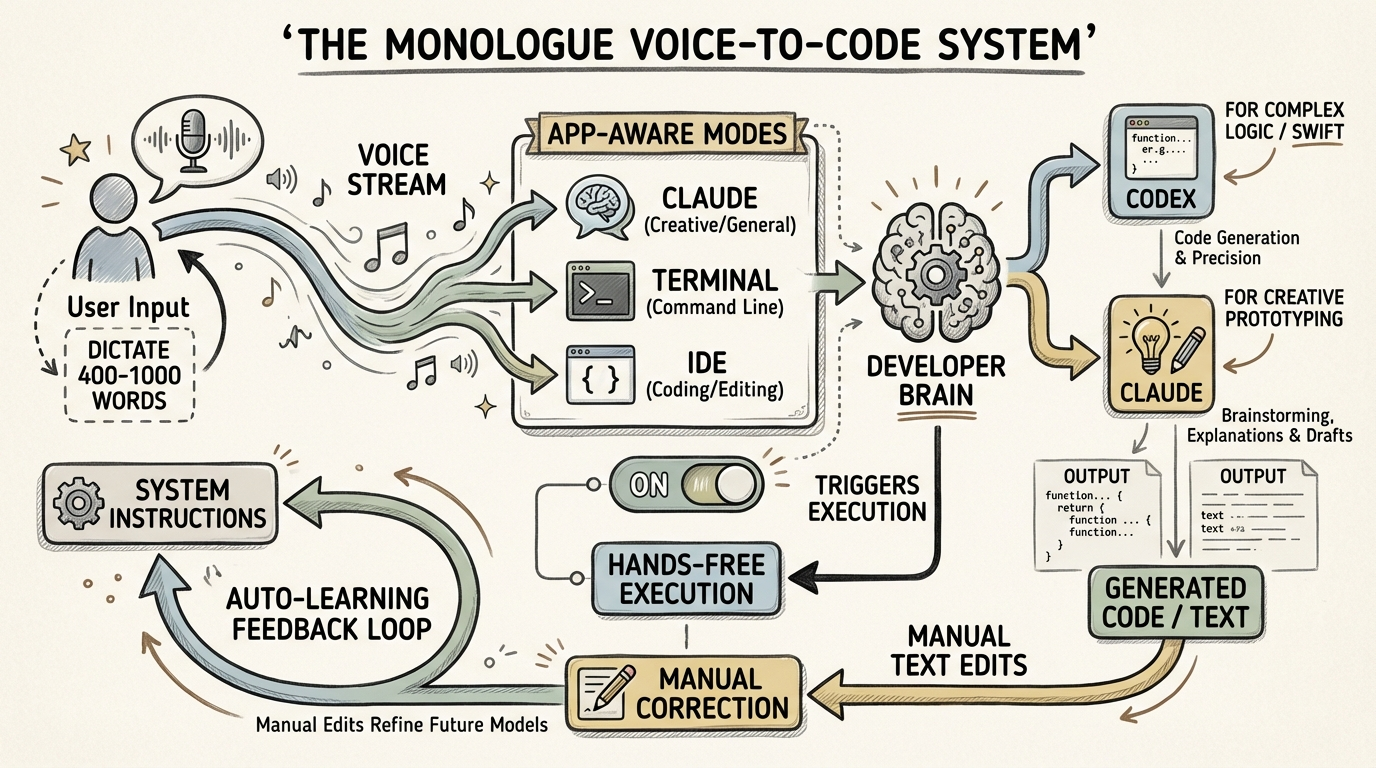
Optimize voice-to-text efficiency by using app-aware 'modes' with auto-enter triggers and bifurcating LLM usage between Codex for codebase logic and Claude for creative prototyping.
Key Insights
High-Context Dictation for LLM Accuracy
06:37:47P90 users dictate 400-1000 words per session; providing massive context via voice yields significantly better LLM outputs than short, typed prompts.
Bifurcated AI Development Strategy
06:45:43Use Codex for precise, 'senior engineer' level edits in complex Swift/Mac codebases; use Claude/Cloud Code for creative, rapid prototyping from scratch.
Context-Aware Mode Switching
06:39:21Configure voice-to-text to automatically trigger specific system prompts based on the active application (e.g., terminal vs. IDE) to eliminate manual prompt engineering.
Adaptive Prompt Evolution
06:50:17The next frontier in voice-to-text is 'auto-improving' modes that learn from a user's manual edits to transcripts to update underlying system instructions automatically.
Systems
Hands-Free LLM Workflow
- Map a specific hardware key (e.g., Right Option) to 'Hold to Record'.
- Enable 'Auto-Enter' for specific apps like Claude or Terminal.
- Define 'Modes' that append specific system instructions based on the active window.
- Dictate prompt, release key, and allow the system to paste and execute the command automatically.
Rapid Feature Validation Loop
- Vibe-code a prototype feature in under one hour using high-level voice descriptions.
- Deploy internally and dogfood immediately.
- If the builder does not personally use the feature daily, discard it immediately rather than iterating.