Brooker
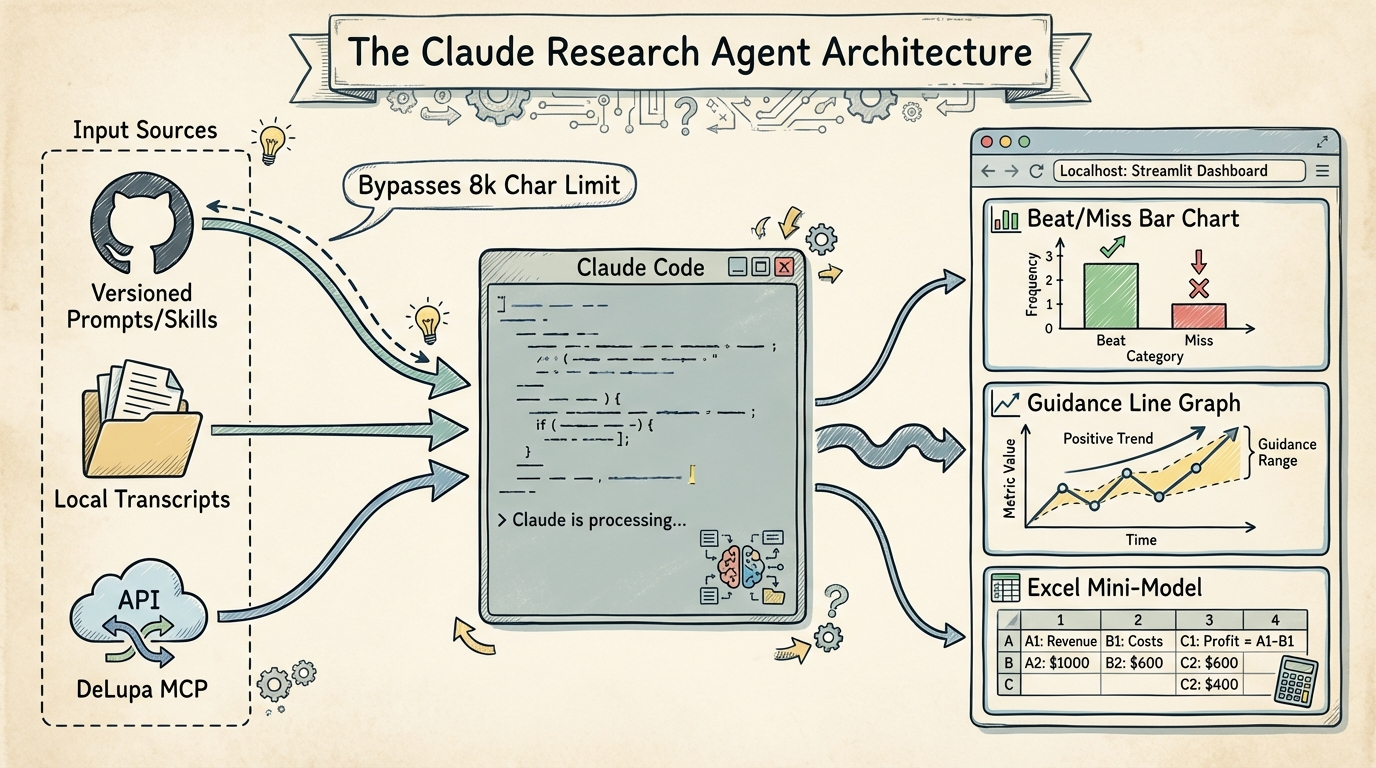
Bypass web UI constraints by using Claude Code in the terminal to orchestrate GitHub-versioned prompts, local transcripts, and financial MCPs into interactive Streamlit dashboards.
Key Insights
GitHub-Versioned Prompting for Complex Workflows
07:34:18Store long-form prompts and 'skills' in a GitHub repository as plugins to bypass the 8,000-character web UI limit and maintain version control over investment philosophies.
Local Compute vs. Web UI Caps
07:38:25Claude Code in the terminal allows for significantly longer compute times (exceeding the ~20-minute web app cap), enabling the LLM to process deeper datasets and generate complex local applications.
Anti-Consensus Prompting Strategy
07:35:25Inject specific, opinionated investment principles (e.g., 'prefer accelerating trajectories over decelerating ones') into the system prompt to prevent the LLM from defaulting to generic, consensus-driven financial summaries.
Interactive Streamlit Outputs
07:32:41Instead of static PDFs, instruct Claude to generate local Streamlit apps that allow for interactive data manipulation, tabbed guidance analysis, and on-the-fly Excel mini-models.
Systems
Automated Earnings Preview Dashboard
- Connect Claude Code to a financial data MCP (e.g., DeLupa).
- Define a local directory path for company transcripts and financial files.
- Create a slash command in Claude Code that calls a versioned prompt from GitHub.
- Instruct Claude to generate a Streamlit application script based on the data.
- Run the Streamlit app on localhost to visualize beat/miss track records and guidance analysis.